Hi friends!
While answering 40 questions to ask yourself every year, I realized I’d adopted a bunch of new tools over 2025. All of them have improved my life, so I want to share them with you so they might improve yours too =D
A common theme is that all of my favorite tools promote a sort of coziness: They help you tailor the spaces where you spend your time to your exact needs and preferences.
Removing little annoyances and adding personal touches — whether to your text editor or your kitchen — not only improves your day-to-day mood, but cultivates a larger sense of security, ownership, and agency, all of which I find essential to doing great work. (And making great snacks.)
Physical
Workshop space
Last summer we moved to a ground-level apartment, giving me (for the first time in my life) my very own little workshop space:

We’re just renting the apartment, so building a larger shed isn’t an option, but it turns out that one can get quite a lot done with floor area barely larger than a sheet of plywood.
I designed a Paulk-style workbench top, cut it out on my friend’s CNC, and mounted it all on screwed-together 2x4 legs:

So far I’ve mostly worked with cheap plywood from Hornbach, using the following tools:
- Makita track saw for both rough and precision cuts. There’s a handy depth stop that makes it easy to do a shallow scoring cut before making a full cut, which reduces tearing out the thin veneer.
- Fein wet/dry vac to collect dust/chips. This includes an electrical outlet you can plug tools in to so the vacuum automatically turns on when the tool is drawing power, which is great.
- My DIY powered air respirator built around a 3M Versaflo helmet has been working great — it’s so much more comfortable than fiddling with separate respirators and eye + ear protection. Since it takes 15 seconds to take on/off, I’m pretty much always wearing it when I’m doing anything in the shop.
- Record Power Sabre 250 desktop bandsaw for quick cross cuts. The accuracy isn’t great, but I haven’t tried replacing the blade or tuning it much yet.
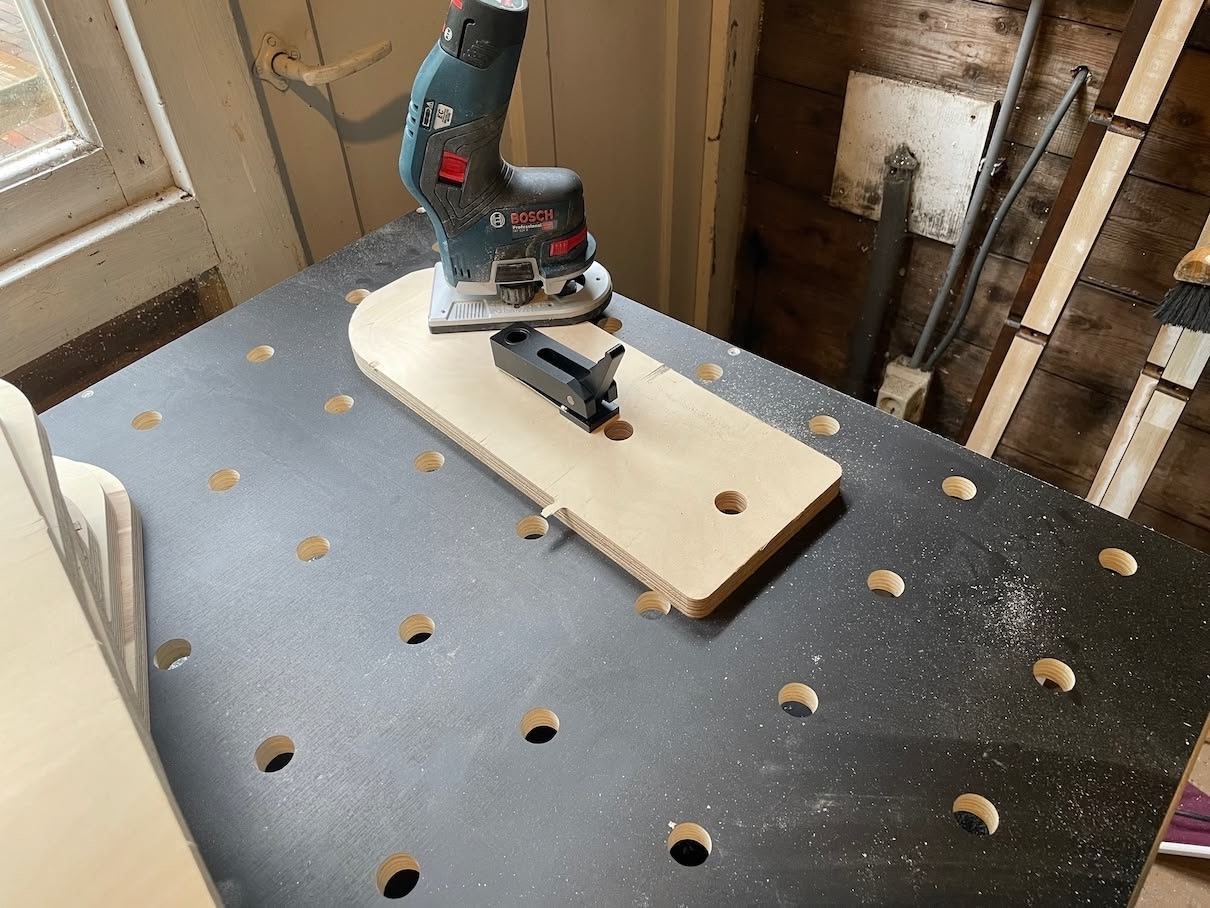
- Bosch 12V palm edge router extremely fun to use for rounding over and chamfering edges:
- Bosch 12V drill/driver is lightweight and compact, and comes with a handy right-angle attachment that I’ve actually used:

- Bosch PBD 40 - a drill press with digital speed control and zeroable digital depth gauge with 0.1mm precision. At $250, the 0.5mm play in the chuck is forgivable.
The workbench has MFT-style 20mm “dog holes” on a 96mm grid, which allows for all sorts of useful accessories.
For example: I purchased Hooked on Wood’s bench dog rail hinges, which makes it easy to flip the track up/down to slide wood underneath to make cross cuts:

The $10 dog hole clamp on the right holds a stop block, which allows me to make repeated cuts.
Since the dog holes were cut with a CNC and the rail is straight, square cuts can be made by:
- making a known straight cut with the track saw on its track (whether on the workbench or outside on sawhorses)
- pushing this reference edge up against the two bench dogs on the top
- cutting along the track
See Bent’s Woodworking for more detail on this process.
While I wish I had space for a full size sliding table saw and/or CNC, this workbench and track saw seems like a decent backyard shed solution.
LED lighting
Last winter I decided to fight the gloomy Dutch weather by buying a bunch of high-CRI LEDs to flood my desk with artificial daylight:
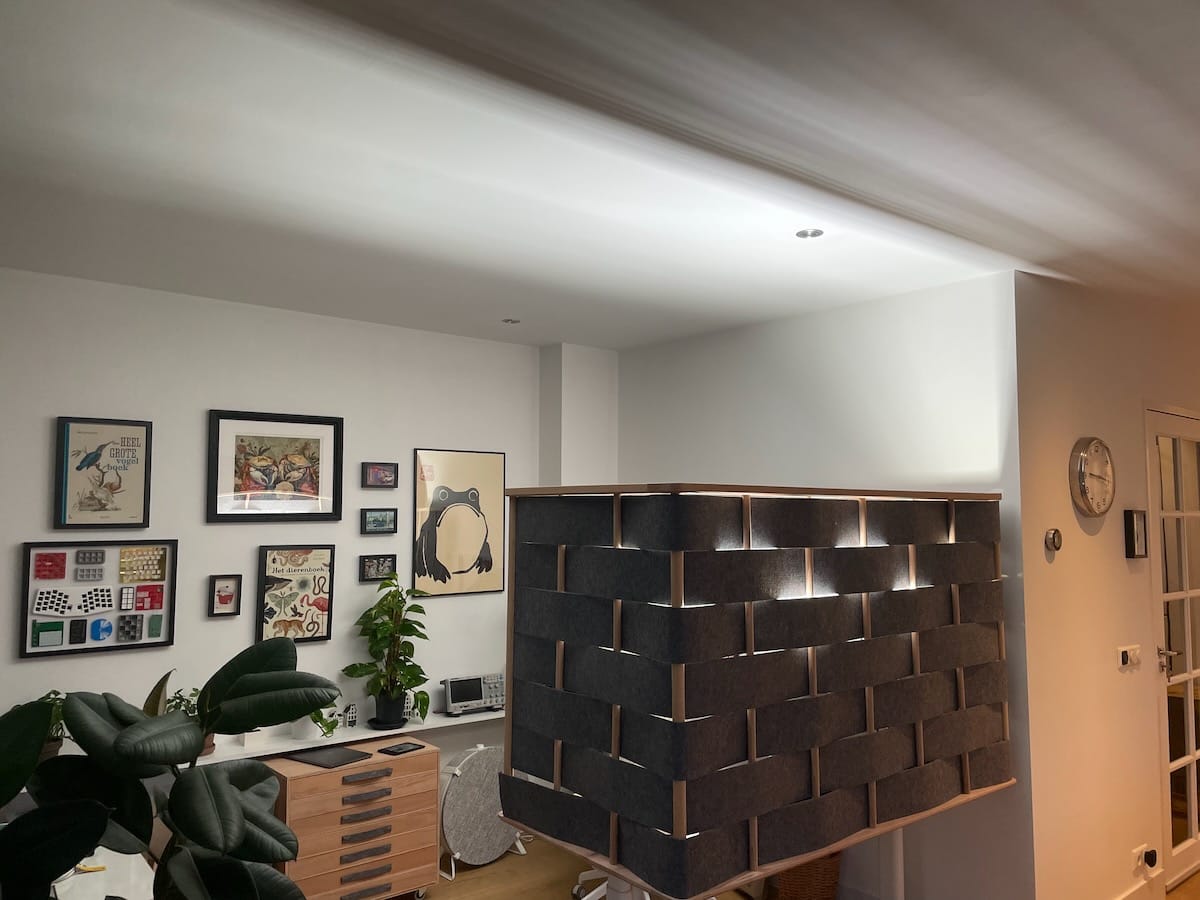
See the build log for more details.
This lighting has worked out swimmingly — it helps me wake up in the morning and makes the whole space feel nice even on the grayest rainy day.
After sundown, my computer switches to “dark mode” colors and I switch the room to cozier warm-white LEDs.
I had about 8 meters of LED strip leftover, which I used with LED diffuser profiles to illuminate my workshop.
Euroboxes
When we moved into our new (completely unfurnished) apartment over the summer, I was adamant I’d build all of the furniture we needed. However, sightly storage solutions have taken longer than anticipated, so to eliminate the immediate clutter I purchased a bunch of 600x400x75mm euroboxes:

At $4/each (used), they’re an absolute bargain.
Since they’re plastic, they slide great on waxed wood rails and make perfect lil’ utility drawers. The constraint of needing to use fixed size drawers makes it easier for me to design the rest of a furniture piece around them.
For example, just take a brad nailer to the limitless amounts of discarded particle board available on the streets of Amsterdam, and boom, one-day-build 3d-printer cart in the meter closet:

Or, throw some drawers in the hidden side of these living room plywood coffee table / bench / scooters:

Now we have a tidy place to hide the TV remote and wireless keyboard/mouse, coffee table books, store extra blankets, etc.
Ikea Skadis coffee/smoothie station
Our kitchen only has 1.6 m2 (17 ft2) of counter space, so we mounted two Ikea Skadis pegboards to the side of our fridge to make a coffee / smoothie station:

The clear Ikea containers are great for nuts and coffee since you can grab them with one hand and drop ‘em in the blender or grinder.
I designed and 3d-printed custom mounts for my Clever Dripper, coffee grinder (1Zpresso k-series), little water spritzer, and bottles of Friedhats beans.
Since we can’t screw into the fridge, the panels are hanging from some 3d-printed hooks command stripped on the top of the fridge cabinet. Clear nano-tape keeps the Skadis boards from swinging.
The cheap Ninja cup blender is quite loud, so we leave a pair of Peltor X4 ear defenders hanging next to it.
Ikea Maximera drawers
As soon as we made the smoothie station we decided to replace the cabinet shelves underneath it with drawers. (The only drawers that came with the kitchen were installed underneath the range, creating constant conflict between the cook and anyone needing silverware.)
Decent soft-close undermount drawer slides from Blum/Hettich cost like $30 each, and for the same price Ikea sells slides with a drawer box attached.
Since we’re renting and can’t make permanent changes to the kitchen, I built a carcass for the drawers within the existing cabinet:

The particle board sides carry the weight of the drawers to the base of the existing cabinet, and they’re fixed to the walls with nano-tape rather than screws.
Nicki 3d-printed cute pulls and we threw those onto temporary fronts made of leftover MDF. As you can see from the hardware poking through, these 8mm fronts are a bit too thin, so I plan to replace them with thicker MDF, probably sculpted with a goofy pattern in the style of Arno Hoogland.
Having drawers is awesome:

We bought a bunch of extra cups for the Ninja blender and keep them pre-filled with creatine and protein powder. The bottom drawer holds the dozen varieties of peanut butter remaining from the Gwern-inspired tasting I held in November. (The UK’s Pip & Nut peanut butters were the crowd favorites, by the way.)
Digital
Emacs and LLMs
I’ve used Emacs for something like 15 years, but after the first year or so I deliberately avoided trying to customize it, as that felt like too much of a distraction from the more important yaks I was shaving through my 20’s and early 30’s.
However, in early 2025 I decided to dive in, for two reasons:
- I ran across Prot’s video demonstrating a cohesive set of well-designed search and completion packages, which suggested to me that there were interesting ideas being developed in the “modern” Emacs community
- I discovered gptel, which makes it extremely easy to query large language models within Emacs — just highlight text, invoke gtpel, and the response is inserted right there.
What’s special about Emacs compared to other text editors is that it’s extremely easy to customize. Rather than a “text editor”, Emacs is better thought of as an operating system and live programming environment which just so happens to have a lot of functions related to editing text.
My day-to-day coding, writing, and thinking environment within Emacs has improved tremendously in 2025, as every time I’ve had any sort of customization or workflow-improvement idea, I’ve been able to try it out in just a minute or two by having an LLM generate the necessary Emacs Lisp code.
My mentality changed to “yeah, I’m sure it’s possible but I don’t have time or interest to figure out how to do it with this archaic and quirky programming language” to “let me spend two minutes trying”.
Turns out there’s a lot of little improvements that can be done by an LLM in few minutes. Here are some examples:
Literally for this article, I asked the LLM to write a Ruby method for my static site generator to render a table of contents (which you can see above!)
Lots of places don’t support markdown natively, so I had an LLM write me an Emacs function to render selected markdown text to HTML on the pasteboard, which lets me write in Emacs and then just
⌘Vin Gmail to get a nicely formatted message.When I write markdown and want to include an image, it’s annoying to have to copy/paste in the path to the image, so I had an LLM write me an autocomplete against all of the image files in the same directory as the markdown file. I’ve been using this for pretty much every article/newsletter I write now, since they usually have images.
I keep a daily activity log as a simple EDN file with entries like:
{:start #inst "2025-12-28T12:00+01:00" :tags #{"lunch" "nicki"} :duration 2}
{:start #inst "2025-12-28T09:00+01:00" :tags #{"paneltron" "computering"} :duration 6
 :description "rough out add-part workflow."}
{:start #inst "2025-12-28T08:20+01:00" :tags #{"wakeup"}}
(Everything’s rounded to the half-hour.)
I started this when I was billing by the hour (a decade ago), and have kept it up because it’s handy to have a lightweight, low-friction record of what I’ve been up to. I used to do occasional analysis manually via a REPL, but couldn’t sleep one night so I spent 30 minutes having an LLM throw together a visual summary which I can invoke for whatever week is under my cursor. It looks like:
Week: 2025-12-22 to 2025-12-28

Locations:
  Amsterdam - Friday 2025-12-19T13:30+01:00

computering       16.5h ##################
box-carts         14.5h ###############
woodworking       13.0h ##############
llms               8.0h ########
dinner             7.0h #######
and includes my most recent
:location(an attribute I started tagging entries with to help keep track of visa limitations while traveling).I’m extremely chuffed about having quick access to weekly summaries and suspect that tying that to my existing habit of recording entries will be a good intra-week feedback loop about whether I’m spending time in alignment with my priorities.
Whenever I write an article or long message, before sending it I run it by an LLM with the following prompt:
my friend needs feedback on this article — are there any typos, confusing sentences, or other things that could be improved? Be blunt and I’ll convey the feedback to my friend in a friendly way.
This one doesn’t even involve any code, it’s just a habit that’s easy because it’s easy to call an LLM from within Emacs. LLMs will note repeated words, incorrect homonyms, and awkward sentences that simple spell-checkers miss. Here’s an example from this very article:
- Double parenthesis:
[Paulk-style]((https://www.youtube.com/watch?v=KnNi6Tpp-ac))— remove one set - “Ikea Maximara drawers” in the heading, but the product is actually “Maximera”
http://localhost:9292/newsletter/2025_06_03_prototyping_a_language/— you’ve left a localhost URL in the FlowStorm section
- Double parenthesis:
Emacs has a pretty smooth gradient between “adjust a keybinding”, to “quick helper function”, to a full on workflow. Here’s an example from the latter end of that spectrum.
I asked Claude Code to make some minor CSS modifications for a project, then got nerd-sniped trying to understand why it used a million tokens to explore my 4000-word codebase and edit a dozen lines:
Usage by model:
        claude-haiku:  8.6k input, 5.4k output, 434.2k cache read, 33.4k cache write ($0.1207)
       claude-sonnet:  1.0k input, 262 output, 0 cache read, 0 cache write ($0.0069)
     claude-opus-4-5:  214 input, 8.3k output, 842.5k cache read, 47.8k cache write ($0.93)
After a bit of digging, it seemed likely this is a combination of factors:
- Claude Code’s system and tool prompts
- Repeatedly invoking tools to grep around the directory and read files 200 lines at a time
- Absolute nonsense — Mario Zechner has some great analysis on this (fun fact: “Claude Code uses Haiku to generate those little whimsical "please wait” messages. For every. token. you. input.“).
For comparison, I invoked Opus 4.5 manually with all of my source code and asked what I needed to change, and it nailed the answer using only 5000 tokens (4500 input, 500 output).
So I leaned into this and wrote my own lightweight, single-shot workflow in Emacs:
I write something like:
@rewrite

/path/to/file1
/path/to/file2

Please do X, Y, Z, thanks!
and when I send it, some elisp code:
adds the specified files to the context window
sets the system prompt to be "please reply only with a lil’ string replacement patch format that looks like …”
sends the LLM response to a Babashka script which applies this patch, sandboxed to just the specified files.
I’ve used it a handful of times so far and it works exactly the way I’d imagined — it’s much faster than waiting for an “agent” to make a dozen tool calls and lets me take advantage of LLMs for tedious work while remaining in the loop.
(Admittedly, this one took a few hours rather than a few minutes, but it was well worth it in terms of getting some hands-on experience building a structured LLM-based workflow.)
A little Photos.app exporter
When you copy images out of Photos.app, it only puts a 1024 pixel wide “preview image” on the pasteboard. This loses too much detail.
The built-in “export” workflow is tedious to use and doesn’t actually compress well, so you have to do another pass through Squoosh or ImageOptim anyway. Of course, you’ll want to resize before you do that, maybe in Preview?
I noticed how annoyed I was trying to add photos to my articles, so I vibe-coded a little Photos.app exporter that behaves exactly like how I want.
UV (Python dependencies)
I haven’t done much Python in my career, but it’s a popular language that I’d occasionally need to tap into to use some specific library (e.g., OpenCV, NumPy, JAX) or run the code behind some interesting research paper.
The package management has always been (from my perspective of a casual outsider) an absolute mess. Yes, with lots of good reasons related to packaging native code across different operating systems and architectures, etc. etc. etc.
Whatever, if pip install failed to build my eggs or wheels or whatever, I’d usually just give up.
As for reproducibility and pinning to exact versions…¯\_(ツ)_/¯.
“Maybe if I do nothing the problem will fix itself” isn’t a great problem solving strategy, but it definitely worked out for me for understanding Python dependency managers: I came across UV in late 2024 and it…just works? It’s also fast!
I can now finally create a Python project, specify some dependencies, and automatically get a lockfile ensuring it’ll will work just fine on my other computer, 6 months from now!
This problem has been a thorn in the side of not just software developers, but also scientific researchers for decades. The folks who’ve finally resolved it deserve, like, the Nobel Peace prize.
Mise-en-place (all dependencies)
This past year I’ve also been loving mise-en-place. From their homepage:
mise is a tool that manages installations of programming language runtimes and other tools for local development. For example, it can be used to manage multiple versions of Node.js, Python, Ruby, Go, etc. on the same machine.
Once activated, mise can automatically switch between different versions of tools based on the directory you’re in. This means that if you have a project that requires Node.js 18 and another that requires Node.js 22, mise will automatically switch between them as you move between the two projects.
I’ve used language-specific versions of this idea, and it’s been refreshing to throw all of those out in favor of a single uniform, fast solution.
I have a user-wide “default” config, containing stuff like:
- languages (a JVM, clojure, ruby)
- language servers (clojure-lsp, rust analyzer, etc.)
- git-absorb “git commit –fixup, but automatic”
- Difftastic AST-aware diffing
- Numbat, an awesome unit-aware scientific calculator
and on specific projects I specify the same and additional tools, so that collaborators can have a “single install” that guarantees we’re all on the same versions of everything.
Sure something like Nix with hermetically sealed, content addressed, etc., etc. is better in theory, but the UX and conceptual model is a mess.
Mise feels like a strong, relatively simple local optimum: You specify what you want through a simple hierarchy of configs, mise generates lockfiles, downloads the requested dependencies, and puts them on the $PATH based on where you are.
I’ve been using it for a year and haven’t had to learn anything beyond what I did in the first 15 minutes. It works.
Atuin (shell history)
Atuin records all of your shell commands, (optionally) syncs them across multiple computers, and makes it easy to recall commands with a fuzzy finder. It’s all self-hostable and is distributed as a single binary.
I find the shell history extremely useful, both for remembering infrequently used commands, as well as for simply avoiding typing out tediously long ones with many flags. Having a proper fuzzy search that shows a dozens of results (rather than just one at a time) makes it straightforward to use.
Before this I wouldn’t have thought twice about my shell command history, and now it’s something I deliberately back up because it’s so useful.
YouTube Premium
At some point in 2025 the ad-blocker I was using stopped working on YouTube and I started seeing either pauses or (uggghhh) commercials (in Dutch, which Google must think I understand, despite 15 years of English GMail, not to mention my Accept-Language header).
Given that YouTube is a Wonder of the World and a $20/month leaves me with a consumer surplus in the neighborhood of $104–105, I decided to subscribe to YouTube Premium.
Honestly I just wanted the ads to stop, but it’s even better — I can conveniently download videos to my phone, which means I can watch interesting videos while riding on the stationary exercise bike in the park near my house.
It also comes with YouTube Music, which immediately played me a late 00’s indie rock playlist that brought me back to college.
100% worth it.
FlowStorm (Clojure debugger)
I don’t normally use debuggers, especially since in Clojure it’s usually straightforward to pretty-print the entire application state.
However, this usual approach failed me when I was building an interpreter for some CAD programming language experiments — each AST node holds a reference to its environment (a huge map), and simply printing a tree yields megabytes of text.
FlowStorm takes advantage of the fact that idiomatic Clojure uses immutable data structures — the debugger simply holds a reference to every value generated during a computation, so that you can analyze them later.
There are facilites to search all of the recorded values. So if you a see a string “foo” on your rendered webpage or whatever, you can easily answer questions like “where is the first callstack where the string ‘foo’ shows up?”.
All of the recorded data is available programmatically too. I used this infrastructure to make a live visualization of a 2D graphics program where as you move your cursor around the program source code, you see the closest graphical entity rendered automatically.
(“A debounced callback triggered by cursor movement which executes Clojure code and highlights text according to the return value” is another example of an Emacs customization I never would have attempted prior to LLMs.)
Whispertron (transcription)
I vibe-coded my own lil’ voice transcription app back in October 2024, but I’m including it in this list because using it has become second-nature to me in 2025.
Before I had reliable transcription at my fingertips, I never felt hindered by my typing speed (~125 words per minute). However, now that I have it, I find that I’m expressing much more when I’m dictating compared to typing.
It reminds me of the difference between responding to an email on an iPhone versus using a computer with a large monitor and full keyboard. I find myself providing much more context and otherwise elaborating my thoughts in more detail. It’s just easier to speak out loud than type out the same information.
This yields much better results when prompting LLMs: typing, I’ll say “do X”; speaking, I’ll say “do X, maybe try A, B, C, remember about Y and Z constraints”.
It also yields better relationships: When emailing and texting friends, I’ll dictate (and then clean up / format) much more detailed, longer responses than what I’d type.
Misc. stuff
I’ve been experimenting with making keyboard-driven, data-dense interfaces on the web. So far I’ve been using the same DataScript + Rum + Elm-style architecture that I’ve been using since Subform in 2016, but I’m looking at updating to Replicant and Nexus, which look pretty solid.
- One piece I still find myself missing in Clojure is modeling my application state with algebraic data types and having my tooling remind me to handle all of the possible cases. I’m not thrilled about writing UI in Rust, but nor does it seem like a good idea to pick up and try to master a new language (F#, Gleam, TypeScript, …Elm?). I’ll be investigating tools and patterns to try and get some of the “statically typed” developer experience in Clojure — if you have any suggestions, I’d love to hear ‘em!
Portals must bend gravity, actually. Video games that don’t respect conservation of energy really bothers some folks.
“So yes, Canada lost its measles elimination status today. But we can get it back in a year and a bit, if we’re serious. And if we’re serious about eliminating measles again, we need to focus more on investing in healthcare workers who speak the language of and can build relationships in communities, and less on implying that certain populations are just inherently unreachable, which just seems like a fundamentally anti-helpful thing to do.”
What I learned building an opinionated and minimal coding agent
“We’re not sure why. Going into the study, we assumed that all three techniques created the correct muscular configuration for an expression of happiness. But we found some evidence that the pen-in-mouth condition may not be actually creating an expression that closely resembles smiling.”
Game Architectures with Alex Evans and Anton Mikhailov - The folks behind the world-building videogame Dreams discuss implementing a purely deterministic game engine with functional updates.