Hi friends,
I’ve been focused on a few projects I’m not quite ready to discuss yet, so this issue is a bit of a smorgasbord of thoughts and vibe-coded tool releases:
- Musings on multi-touch: After 20 years, why is it still just zooming/scrolling?
- Probetron: Turning a Raspberry Pi 4b into a network-accessible microcontroller programmer/debugger
- LLM task workflow harness
Also, I’ll be in:
- New York City, Sept 26–Oct 6
- Milan, Oct 6–8
Let me know if you want to hang or have any favorite food/activity recommendations!
Why not more multitouch?
Apple popularized multitouch input with the iPhone and Mac trackpads in the late ‘00s, and since then it seems like most programs still only take advantage of the multitouch input for passive navigation: vertical scrolling, horizontal panning, and zooming.
Multitouch gestures are certainly well suited to these uses; in comparison, I feel extremely slow and clumsy whenever I have to zip around a PDF document or 2D canvas using only a mouse/trackball while holding down control/shift/command/who-can-even-remember.
However, I’m surprised that so little software seems to take advantage of such high-bandwidth human control input. In researching this topic I came across BetterTouchTool and was floored by the enormous number of gestures and input modalities it supported out of the box:
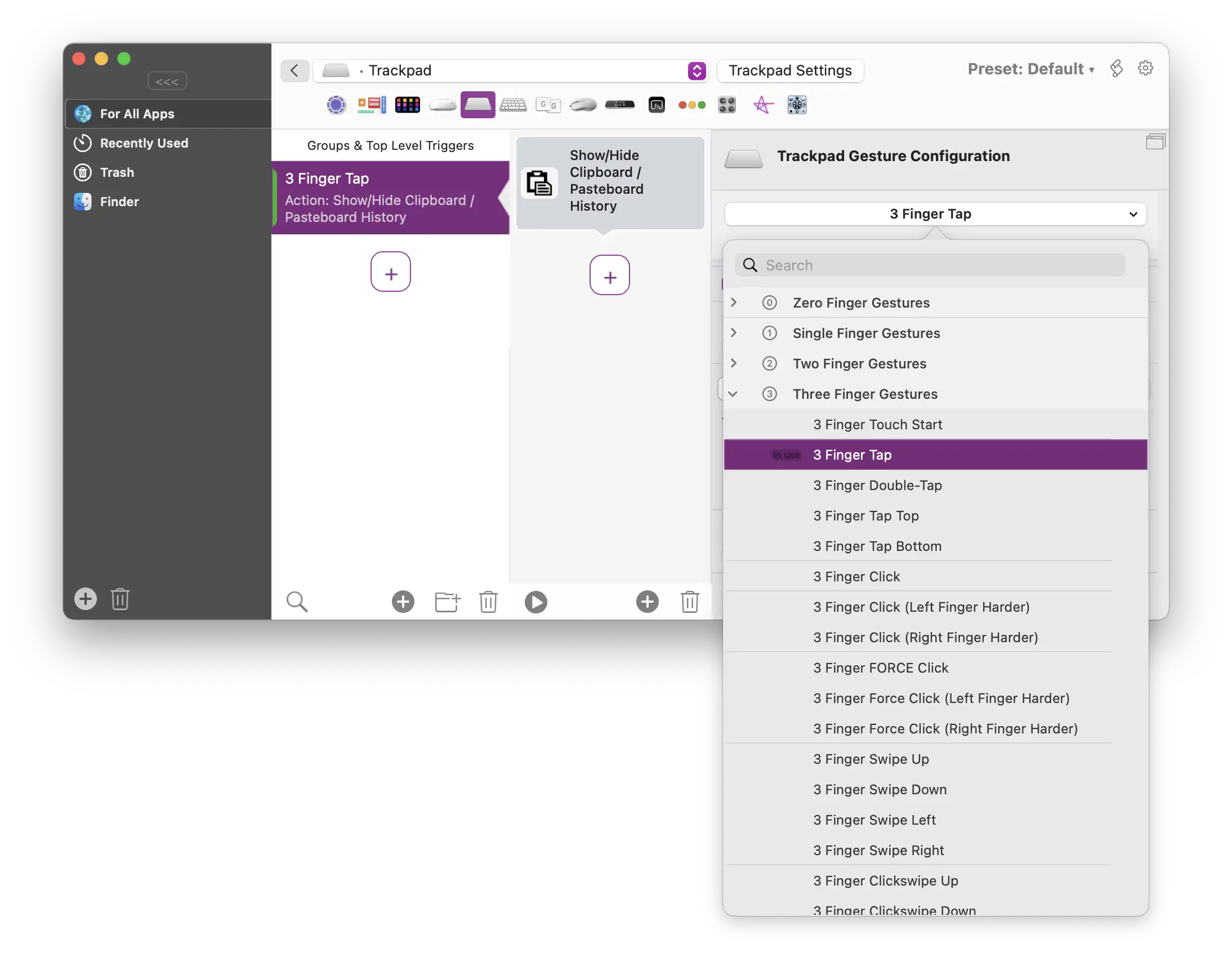
I’m now using it to map various taps and touches to commands like move/duplicate/rotate in my CAD tool, so that I can keep my hands on the trackpad rather than constantly running them back and forth to press hotkeys on the keyboard.
While it’s certainly fun to map a rotation of my fingers to the “r” key to trigger a “rotate” command in KiCad, it has me thinking of just what might be possible if multitouch were actually designed into an application rather than “bolted-on” like this to existing key shortcuts.
I’m sure iPad apps have a lot more sophisticated touch handling, though the locked-down, consumption-oriented focus of that device has kept me away from it. The two apps I’ve noticed as an outsider to the platform are:
- Concepts (having only seen it in use via Stuff Made Here’s engineering videos)
- Shapr3d, a legit Parasolid-backed CAD program on the iPad supporting touch and pencil
I’ve heard there are plenty of “Professional” apps for the iPad — let me know if you’re using any that have sophisticated multitouch or pen input for creative work!
Recently I’ve been designing PCBs using KiCad, and the experience of trying to place and connect hundreds of objects by tediously clicking on them one-by-one and nudging them around with arrow keys or a single cursor has me dreaming of what a multi-touch-forward interface might look like. What sorts of operations might we have for making selections, refining them, and manipulating the underlying entities?
Four years ago I experimented with CADtron, a pen/mouse-gesture-first 2D geometric CAD, and I’m starting to get the itch again. Especially now with LLMs doing the grunt work, it feels possible to build something more than just a research prototype…
Probetron
Speaking of LLMs and designing circuit boards, I recently found myself shuttling a microcontroller between:
- my desktop computer, where I was having an LLM generate firmware, and
- my lab bench, where I was connecting it to an apparatus
After a few iterations of this — asking the LLM to generate some firmware, flashing it, walking it over and reconnecting on the bench, noting the error message, relaying that back to the LLM, repeat — I realized I’d become what my friend calls a “reverse centaur”. Where a regular centaur combines the strength and speed of a horse body with the intelligence of a human head, the reverse centaur combines the feeble body of a person with the skittish, doofy mind of a horse — the worst of both worlds.
Upon realizing this, I threw together a tool for flashing a microcontroller and forwarding input/output (SWD, UART, and USB serial) over the network. This would allow me to put “hardware-in-the-loop” as they say, hand everything to an LLM, and take myself out of the inner “is the well-specified feature actually working?” iteration loop.
I built everything around a Raspberry Pi 4b, as I had one lying in a drawer. The device-under-test (DUT) can be flashed and reset using the Pi’s GPIOs, so no additional programmer hardware is needed:
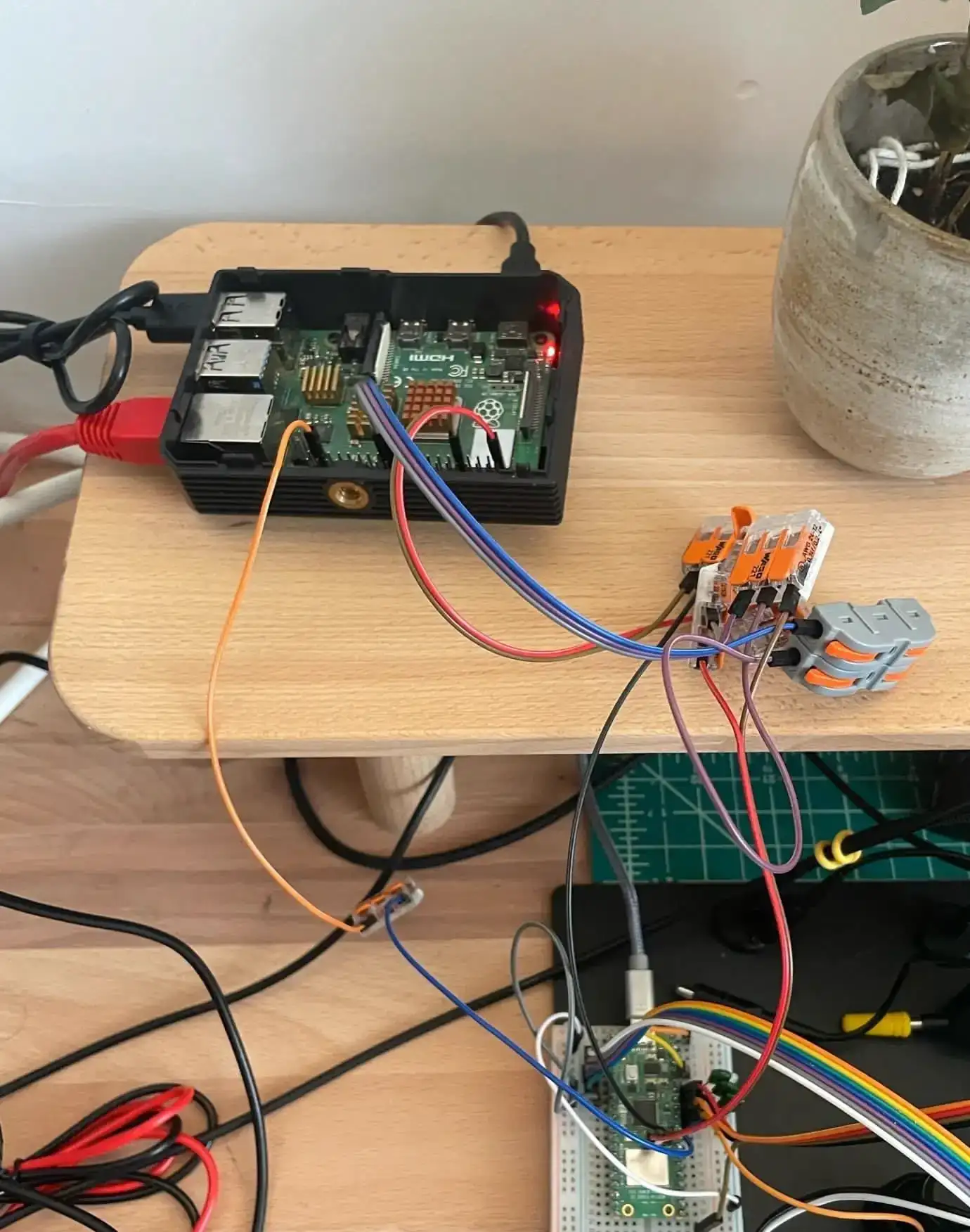
My initial “this’ll take an hour for an LLM to throw together” estimate turned out to be a bit off — the project took the better part of a weekend. Partly scope creep:
- baking an immutable SD card OS image from within a Linux VM rather than provisioning software on the Pi directly
- refusing to require any configuration/setup on client machines, which, when combined with SSH really not wanting you to have keyless/passwordless login, means a lot of shenanigans serving an SSH private key over HTTP (lol)
but mostly because lots of lil’ rough edges came up during my initial usage:
- the probe.rs progress bar doesn’t use newlines, but instead relies on learning your terminal’s width so that your terminal actually wraps the lines (and thus the script needs to forward your terminal width to the Pi)
- when the Pi wasn’t coming up on the network, since I didn’t have an extra monitor handy to debug it, the LLM recommended adding “usb gadget mode” to the image so that when plugged into another computer via USB-C, the Pi would identify as a network adapter and thus you could SSH in to debug over a USB cable (that was a pretty cool solution, I thought)
- there were all sorts of race-conditions related to the DUT’s serial-port-over-USB; I exposed the USB serial via a TCP socket so that the programs I’d already developed for my firmware would need only minimal modifications (opening a
tcp://...instead of/dev/tty.usbserial123). This was quite glitchy until I realized that my firmware’s “hello, thanks for connecting to me” initial message was getting lost in the Pi’s OS buffers — I had to modify the harness on the Pi so that it only opened the usb serial port when a real client connected to the TCP socket (and likewise closed the serial port when the TCP socket closed).
The code is 100% LLM-generated, but it’s working well enough in my use case flashing rp2350 microcontrollers and forwarding their USB serial output, that it’s likely useful to others as well. I’ve open-sourced the repo here, give it a spin and let me know how it goes!
A single-file LLM task workflow harness
Back in May, I wrote:
No matter how much you plead in markdown:
You MUST run
test.shbefore committingthere’s a chance they’ll just go ahead and commit anyway (or “fix” the failing test by deleting it, etc.).
If you want LLMs to follow a deterministic process, you must use them via a deterministic harness.
Beyond simply ensuring tests/linters are run, another trick I’ve found that improves LLM code output is running a fresh context with a generic prompt like “review the last commit and tidy up any duplicated code, verbose comments, etc.”. I found it pretty funny that even a frontier model like Fable 5 reliably makes a mess when it’s implementing anything, such that running the same model in a fresh clean up context yields a transcript full of gems like “oh, this last commit added the same block of code in four places, I should make this a reusable function!”
While there are tons of harnesses out there, I wanted one that’s small and human-readable. For fun, I made it a single Babashka file so it’d be totally self-contained and easy to copy, modify, etc.
I’ll first talk about the workflow, then about the implementation details in Clojure and my dissatisfaction with the explicit state-machine architecture.
Task workflow
For the workflow itself, I was inspired by my friend Colin’s pi-task, in particular how it “frontloads” human involvement: One starts by interactively discussing the task scope with LLM first, then factoring that into a plan, which is then implemented autonomously.
I really enjoy the interactive design session, which is substantially more comprehensive than the “plan mode” built into Claude Code and Codex (which only seem to ask me a few clarification questions at best before trying to jump into implementation).
My harness follows Colin’s by starting with separate steps (context + prompt) for:
- discussing the scope of the task itself (“refinement”),
- how to implement that scope in terms of individually deliverable/testable subtasks (“planning”),
- reviewing the plan
The prompts for these steps encourage the LLM to ask a single multiple choice question at a time, but since the responses are free-form text it’s always easy to steer the conversation:
- none of these are good options, what about direction X?
- let’s not do this functionality at all
- this is a prototype, don’t worry about that edge case
- clone project A and see how they handled this
After the task has been refined, the fresh context of the planning step divides the (now detailed) task specification into explicit subtasks. Each subtask can have:
- explicit dependencies (on other subtasks)
- check scripts that must pass before the subtask can be committed
To accomplish task X, the subtasks might be something like:
- refactor the existing functionality spread across the codebase into a new crate/name
- add new namespace with additional supporting functionality
- implement X using these two new namespaces
I much prefer steering not-so-clever implementation agents upfront, rather than having a “frontier long task horizon” agent get, uh, creative with a gazillion tokens.
Finally, the “plan review” step launches a fresh context to review the generated plan. This has the same free-form Q&A format discussed above, and usually finds a handful of places where the subtask implementation or testing details are unclear.
This last step can be repeated as many times as desired.
Furthermore, I designed the workflow to emit task.md as a sort of “structured markdown”:
# My task

check: tests-run-for-every-subtask.sh

Some background context that's given to every implementing subtask

## Subtasks

### a

some subtask

### b

dependencies: a

another subtask

### c

check: specific-test-only-for-this-subtask.sh

yet another subtask
so at any point you can decide to “take matters into your own hands” and edit the plan/subtasks directly rather than try to explain it to the LLM.
I tend to spend about 30–60 minutes in these authoring steps, which yields a task.md overview that is much more detailed and comprehensive than anything I’d have come up with on my own in the same period of time.
A test-plan.md is also generated, which is intended to help you walk through and test that the task was done properly — it contains stuff like user interface and hardware tests that the LLM can’t do on its own as part of the implementation.
Once you’re happy with the plan, run tasktron.clj approve and the harness will:
- create a new branch for the task
- start subtask implementations in parallel, using git worktrees
Each subtask implementation agent is prompted “Do just [subtask description] as part of [task description]”. When the implementation agent completes, a review agent is prompted “Review this commit for conformance to this task and subtask” and can decide to:
- approve the code unchanged
- approve the code with amendments
- reject the code and restart the subtask with a fresh implementation context with additional instructions
When approved, the harness handles cherry-picking the commit onto the task branch tip. (If there’s a conflict, an agent is started to handle it.)
While the task is cooking, a status overview is displayed:
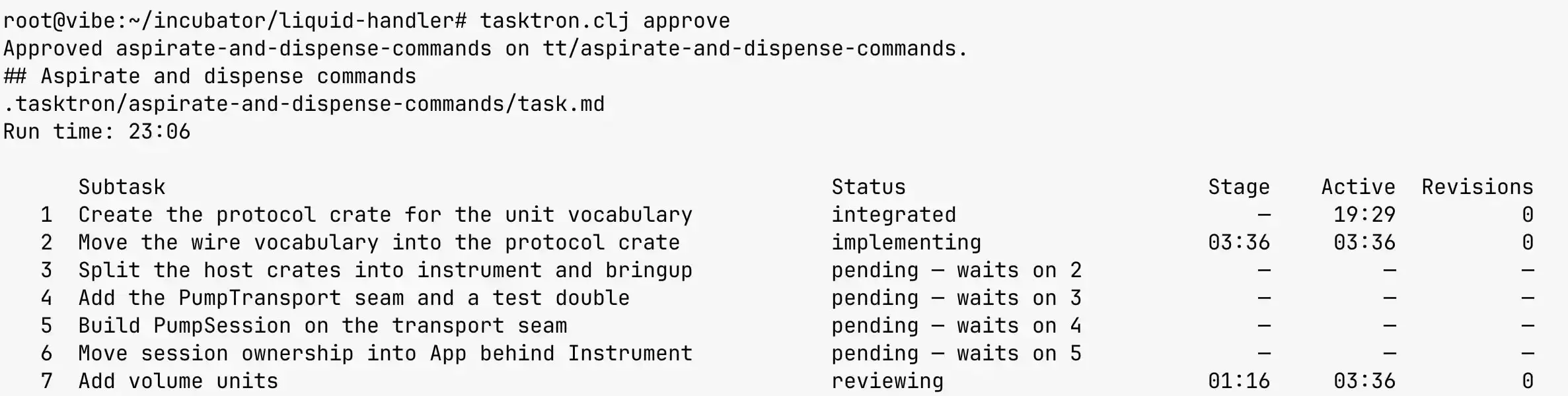
Once everything has been completed, I review the work and merge the branch myself.
I tend to do non-fast-forward merges so it’s clear in the git history that some commits were done as part of a single conceptual task.
As part of the merge, I also check-in the task.md and test-plan.md so that context is stored in the repository.
I’ve been using this workflow for about a month and I’m quite happy with it thus far. The authoring workflow in particular has been awesome, and it has definitely helped me come up with better designs than I would’ve otherwise. I’m also happy with the local-first workflow where everything is built using git branches and worktrees (rather than some remote issue tracking API).
If you want to give it a spin, put tasktron.clj on your path, run it in a git repository, and follow the instructions.
It shells out to pi and/or claude, and you can edit the source to select the harness and model for the specific workflow step.
(I can’t stand talking to Claude but have free tokens, so I discuss with GPT-5.6-Sol and have Opus 4.8 implement.)
Task harness implementation
One of my goals was to implement the task harness as a single, “obviously correct” file, which could be read from the top down in a sort of “bottom-line up front” fashion, with the overall architecture coming first and the grittier implementation details coming later. (See Grant Slatton’s How to write complex software for more on this approach.)
I wrote it in Clojure, as that’s a concise, data-oriented language I know well.
Finally, I wanted the harness to be robust, with all of the essential state stored on disk, so that after an LLM provider outage, power outage, etc., I could just run tasktron.clj again and it would continue exactly where it left off (ideally resuming the in-flight LLM sessions by their transcript UUID in the same worktrees).
To do this, I implemented the system as an explicit state machine, using Malli to make legible the expected data shapes.
For example, each subtask state is associated with some data and possible transitions to other states:
(def state->definition
  {:initial               {:schema      :map
                           :transitions {:specified :pending}}

   :pending               {:schema      :map
                           :transitions {:implementation-started :implementing}}

   :implementing          {:schema      [:map [:base CommitId]]
                           :transitions {:implementation-finished :checking
                                         :blocked                 :blocked}}

   :checking              {:schema      [:map [:base CommitId] [:commit CommitId]]
                           :transitions {:check-passed :reviewing
                                         :check-failed :revising
                                         :blocked      :blocked}}

   :reviewing             {:schema      [:map [:base CommitId] [:commit CommitId]]
                           :transitions {:feedback :revising
                                         :amended  :checking-amendment
                                         :approved :awaiting-integration
                                         :blocked  :blocked}}

   ...})
The events associated with each subtask are stored in an append-only log on disk, from which the current state is derived. The next state is derived from the current state and some event, usually the result of an agent turn, but which might also come from the harness itself (running tests, reporting an infrastructure failure, etc.).
Effects are reified as data so that side-effects can be isolated to a single function and the vast majority of the code and tests can remain functionally pure (i.e., they don’t have side-effects and they return values determined entirely by the provided arguments). The effects themselves are derived from the state; e.g., if the next state is “attempt-rebase” the associated effect contains the commit ID of the source and the commit ID of the target (that we’re trying to rebase onto), with the effect handler returning an event (either “success, here’s the new commit ID” or “there’s a conflict”).
The core interpreter loop of the harness is then fairly compact:
(loop [state                   initial-state
       subtask                 nil
       event                   initial-event
       subtask->running-effect {}]
  (let [observed-task   (parse-task (slurp (str (fs/path task-dir TASK-FILENAME))))
        state           (reconcile-task state observed-task)
        next-state      (step state subtask event (now))
        effects-desired (effects-for-state next-state)
        effects-pending (remove (fn [{:keys [subtask]}]
                                  (contains? subtask->running-effect subtask))
                                effects-desired)]

    ;; Write state before running effects so re-running recovers from crashes.
    (save! task-dir next-state)
    (report! next-state (now))

    (let [subtask->running-effect (reduce (fn [active {:keys [subtask] :as effect}]
                                            (submit-effect! executor completed worktrees runtime effect)
                                            (assoc active subtask effect))
                                          subtask->running-effect
                                          effects-pending)]
      (if (seq subtask->running-effect)
        (let [{:keys [subtask event]} (await-completion! completed interactive? report! next-state)]
          (recur next-state
                 subtask
                 event
                 (dissoc subtask->running-effect subtask)))
        next-state))))
All-in-all, the harness consists of:
- 500 lines of prompts and Malli schemas
- 1500 lines of domain-specific workflow and task interpreter code
- 500 lines of supporting code for parsing/generating markdown, interacting with Git, and handling CLI arguments
- 2000 lines of LLM generated tests
While it works well enough, I don’t feel like the code meets my goal of being “obviously correct”.
All the code reifying effects, managing an explicit state machine, and deriving state from an immutable log all obscure the core subtask workflow:
- create/reset the worktree to the latest branch tip
- invoke implementation agent on the subtask
- run the check script(s)
- invoke review agent, having it either accept, amend, or send back to re-implement from scratch
- run the check script(s) again (if amended)
- allow up to 3 retries of this loop (more than that indicates the subtask is ill-specified)
- cherry-pick onto the branch tip
I’ve been quite happy with this core workflow, and actually want to extend the harness with a “one-shot” entry point that kicks off this workflow for a single prompt (skipping the full refinement and plan steps), for those cases where I’m working on something and notice a minor thing that could be fixed/improved that I can review later when I’m finished with my current work.
Before I add new features to the harness, though, I’d like to refactor away from the explicit state machine design to reduce the amount of code.
I’m thinking the “durable execution” pattern might be a good fit. Essentially, memoize (durably, on disk) every side-effecting function call such that on failure/restart the system automatically “replays” itself back into the same state without re-executing side-effects that’ve already run.
Most of what I’ve found in this space (e.g. Temporal, Armin Ronacher’s Absurd Workflow) rely on some external database service, which is antithetical to my “it’s a single readable script” goal. I’m curious to see how concisely everything could be hand-rolled in Clojure, but of course if you are aware of relevant prior art (in any language) please let me know!
Misc. stuff
What If Sliding Could Be Controlled? A roboticist discusses making a 3d-printed foam parallel gripper interface with embedded magnets and optical sensors so a robot can toss/slide objects around.
“Most humans became trained to expect that most questions in fact have answers. To believe that there is a place — the library, Google, or an LLM — where one may Enquire Within About Everything, reducing the urgency of actually enquiring about anything.”
A Monopoly on Poop “It’s practically cliché to say at this point, but the reason that the FDA is trying to restrict access to [fecal microbiota transplant] in favor of Rebyota is that the modern American healthcare system is built around making profit for corporations rather than getting people healthy—to the extent that the system is no longer capable of accommodating something that simply works.”
Way too much detail about the blinking lights of TermDriver2
Being Linux Torvalds: “Automatic programming, instead, in the hands of people that are expert technicians, or expert programmers, expert designers, expert software architects, is to assume the role of Linus, with the agents and the LLMs assuming the role of the different maintainers of the different subsystems.”
There are Exactly 1½ Games of Rock Paper Scissors. Shortly followed by Actually, there are 1.4937 games of Rock Paper Scissors
Scaling Up the Full Scroll Dial - High Resolution Scrolling Device